Turn Client Feedback Into LinkedIn Gold: A Smart Survey Strategy
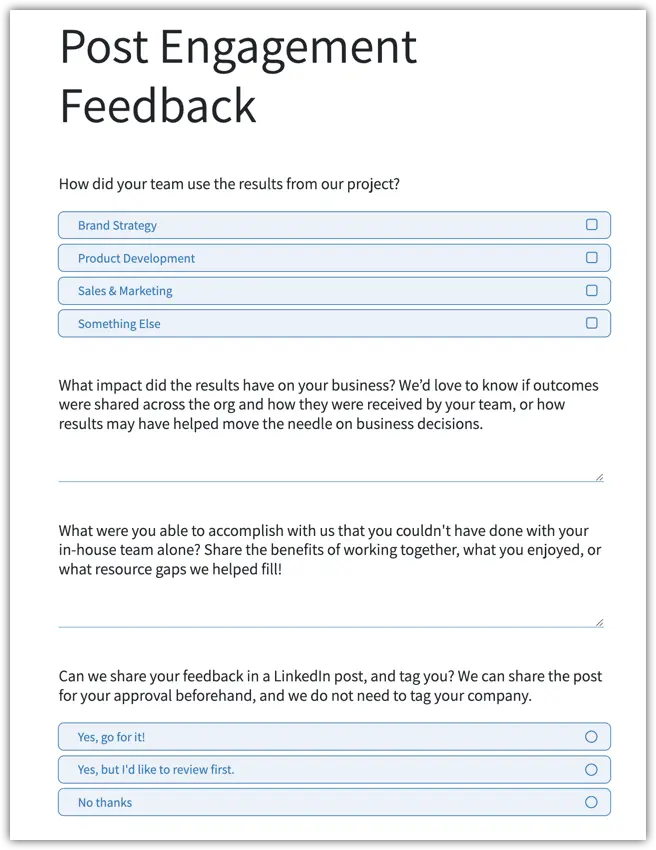
Getting meaningful feedback from clients shouldn't feel like pulling teeth. But here's the thing most businesses miss: the way you ask for feedback determines both the quality of insights you'll receive and whether you can actually use those responses to build your reputation.
Why the Odoo Survey App Works for Client Feedback
Odoo's survey tool gives you exactly what you need without the bloat of expensive feedback platforms. You can create professional surveys in minutes, send them via email, and track responses in real-time. But the real power isn't in the tool itself—it's in how you structure your questions.
The Three-Question Framework That Actually Works
Instead of asking clients to rate you on a scale of 1-10 (yawn), ask questions that uncover the story of your impact:
Question 1: How did they use your work? Give them checkbox options applicable to your project or industry. This tells you where your work creates value and helps you identify patterns across clients.
Question 2: What impact did it have? This is where the magic happens. By asking about business outcomes and organizational buy-in, you're prompting clients to articulate your value in their own words. These responses become case study gold.
Question 3: What couldn't they have done without you? This question gets clients to explicitly state the gap you filled. It's the difference between "they were helpful" and "we couldn't have launched our rebrand without their consumer insights."
The 'Sneaky' LinkedIn Permission Question
Here's the clever part: After clients have just finished telling you how great you are, include one final question:
"Can we share your feedback in a LinkedIn post, and tag you?"
Offer three options:
- Yes, go for it!
- Yes, but I'd love approval first
- No thanks
Why this works:
- Timing is everything: They've just reflected on your positive impact, so they're in the right mindset
- Low barrier: You're asking for LinkedIn permission, not a formal testimonial that requires corporate approval
- Control options: Giving them approval rights removes the fear factor
- No company mention needed: This makes it easier for individuals to say yes without running it up the flagpole
Making It Work in Odoo
Set up your survey in Odoo, there are a few settings to be mindful of.
- For a short survey, it's a good idea to put all the questions on one page. Go to the "Other" tab and make the config change for Pagination.
- If you have an "other" type answer, which typically, in other platforms, asks the user what that answer is...you'll need setup and additional question with conditional logic in the "Other" tab (note: this is found at the questions level).
- Also, the fonts in the out of the box Odoo survey are wacky. I've tamed them a bit in my Odoo setup. You should too.
The Bottom Line
Client feedback shouldn't live in a folder somewhere. With the right questions and tools like Odoo, you transform testimonials into a steady stream of authentic social proof while simultaneously gathering insights that sharpen your business strategy.
And when a happy client gives you permission to share their story? That's not sneaky—that's just smart marketing.